
Table of Contents
This article covers how to connect FedEx Freight® to your ShipperHQ account so you can display live LTL rates at checkout.
Other FedEx services: ShipperHQ supports a wide variety of FedEx services, including FedEx Express Freight. See FedEx for a full overview.
Requirements
- The LTL Freight advanced feature enabled on your ShipperHQ plan
- Your FedEx Account Number
- Your Freight Account Number (if you don't have a separate one, use your FedEx Account Number)
Adding FedEx Freight
Adding and Validating FedEx Freight
Enabling FedEx Freight
- In your ShipperHQ dashboard, navigate to Carriers and click + New to add a new carrier.
- Click See all live rate carriers. Search for and select FedEx Freight.
- Click Enter Credentials to begin the validation.
Validating Your Carrier
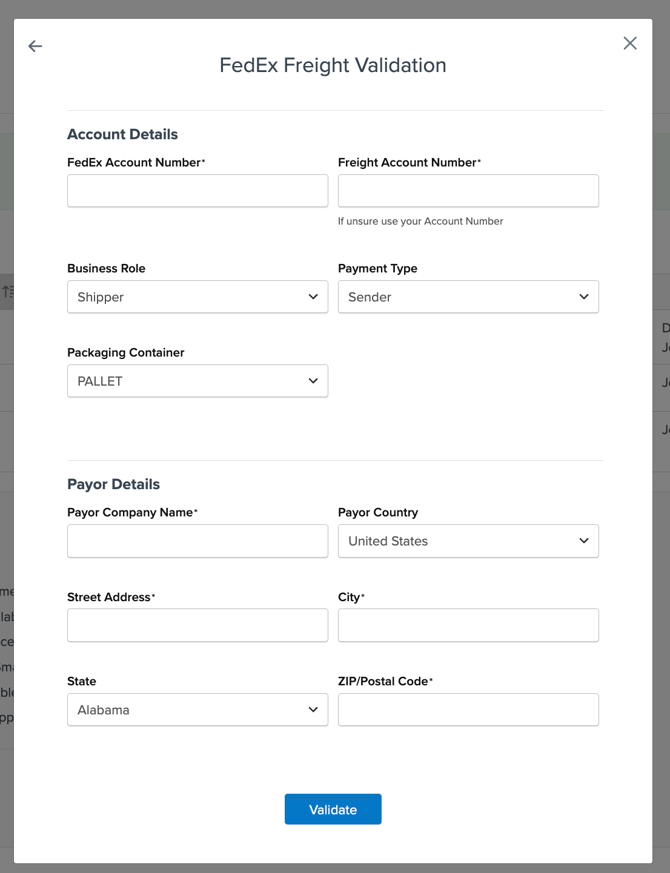
- On the FedEx Freight Validation screen, complete the Account Details section:
- FedEx Account Number
- Freight Account Number (if you don't have a separate Freight Account Number, use your FedEx Account Number)
- Business Role — select your role in the shipment (Shipper, Consignee, or Third-party)
- Payment Type — select how freight charges are paid (Sender, Recipient, or Third-party)
- Packaging Container — select your default container type (e.g., SKID)
- Complete the Payor Details section with your company name and the billing address on file with FedEx Freight.
- Click Validate when finished.
If validation is successful, click the toggle button to enable the FedEx Freight carrier.
If validation fails, please contact ShipperHQ Support for further assistance, or review what has been entered for accuracy and attempt to enter your credentials once more.
Freight Shipping Configuration
Use any of the following links to configure your FedEx Freight LTL Freight carrier:
- Setting Weight Thresholds for Oversized Carts
- How to Set Items that Must Ship Freight
- Setting Up Shipping Groups