
Table of Contents
- What Is Enhanced Checkout?
- Supported Platforms
- Plan Requirements
- Features
- Setting Up Enhanced Checkout
Standard checkout uses your ecommerce platform's native flow, with ShipperHQ providing rates, delivery estimates, and shipping options based on your rules. Enhanced Checkout replaces the default shipping section with a fully customizable interface that gives customers more control and visibility. It’s designed for merchants who want to deliver a more personalized, conversion-focused checkout experience.
What Is Enhanced Checkout?
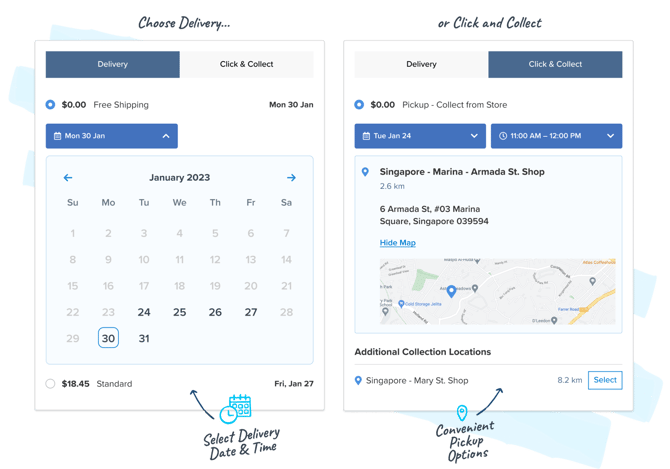
Enhanced Checkout works alongside your existing ShipperHQ configuration. When Enhanced Checkout is enabled, the checkout shipping section becomes interactive rather than static. Customers can see delivery dates, select time windows, pick up from a mapped store location, and, for orders shipping from multiple warehouses, choose delivery options for each shipment separately.
For example, a customer ordering a birthday cake can select delivery for the morning of the party, ensuring it arrives fresh and on time rather than late or when no one is home.
Behind the scenes, enabling Enhanced Checkout also activates Advanced Shipment Details, which gives you access to richer order data after purchase: carrier, method, packing specifications, and dispatch and delivery dates. This is useful for fulfillment workflows and post-purchase automations.
Plan Requirements
Enhanced Checkout requires the ShipperHQ Enterprise plan.
To check whether your plan supports it, log in to your ShipperHQ dashboard and go to Advanced Features. If Enhanced Checkout is listed and can be toggled, your plan includes it. If it isn't visible, contact sales@shipperhq.com to discuss upgrading.
Supported Platforms
Enhanced Checkout is available on:
- Shopify Plus
- Adobe Commerce
- Magento 2
- BigCommerce
Feature Availability: Not every feature is available on every platform. See your platform's setup guide for a full breakdown.
Features
Enhanced Checkout gives merchants significant control over how delivery and pickup options are presented at checkout.
Delivery date calendar — Customers select a delivery date from a visual calendar. Availability is controlled by your Delivery Date & Time configuration in ShipperHQ.
Time slot selector — Customers choose a preferred delivery or pickup time window. Requires In-Store Pickup or Delivery Date & Time to be configured.
In-store pickup map — A visual map showing your pickup locations. Customers select a location and, where configured, choose a time slot. Requires In-Store Pickup to be configured.
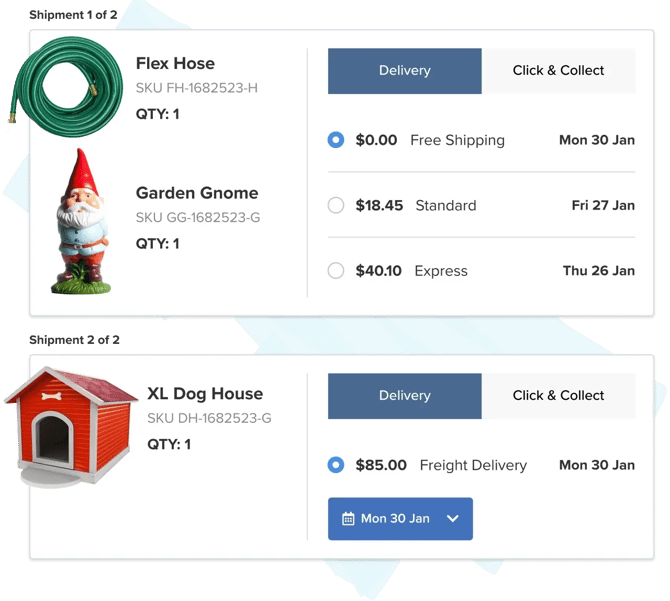
Split shipping — When an order ships from multiple origins, customers see delivery options per shipment rather than a merged rate. Lets customers make informed choices when items are coming from different warehouses.
Advanced Shipment Details — Rich post-purchase order data accessible via your platform dashboard or API, including carrier, method, packing details, and estimated dispatch and delivery dates.
Setting Up Enhanced Checkout
What Enhanced Checkout looks like and how it works varies by platform. On some platforms it unlocks features that aren't otherwise available; on others it changes how existing features are presented. See your platform’s setup guide to understand what features and functionality are available.
- How to set up Enhanced Checkout on Shopify
- Installing the ShipperHQ Magento 2 Enhanced Checkout (also covers Adobe Commerce)
- Enable Enhanced Checkout on BigCommerce
FAQ
Does Enhanced Checkout support preorders and in-stock items in the same order?
Yes. Enhanced Checkout supports separate delivery methods, shipping costs, and delivery dates for preorder and in-stock items within a single cart, giving customers full visibility into how and when each item will arrive.
How does Enhanced Checkout help ensure orders ship on time to meet promised delivery dates?
Enabling Enhanced Checkout also activates Advanced Shipment Details, which surfaces detailed order-level shipping data your fulfillment team can act on, including the selected carrier, service, and shipping cost; package-level packing details; required dispatch date based on delivery promises; and shipping origin and method for each part of the order. This data can sync with your OMS or ERP to help your team ship on time and meet delivery promises.