
Table of Contents
- How the Plan Allotment Works
- Enabling & Disabling Features
- Advanced Features
- Plan Limits vs. Plan Restrictions
- Duties & Taxes
- Upgrading Your Plan
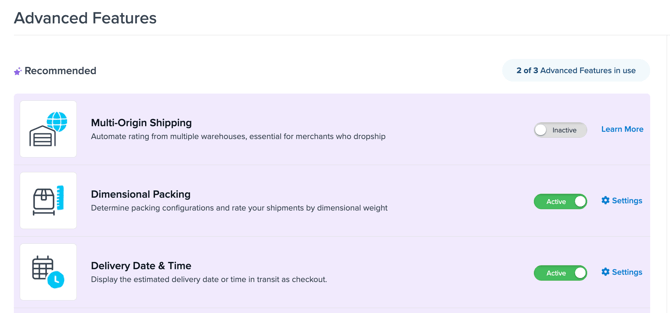
Advanced Features are a defined set of capabilities in ShipperHQ that go beyond core rate calculation — things like dimensional weight packing, multi-location fulfillment, real-time delivery dates, and address validation at checkout. Each ShipperHQ plan includes a set number of Advanced Features slots. You choose which features to activate, up to your plan's limit, from the Advanced Features page in the ShipperHQ dashboard.
How the Plan Allotment Works
Each ShipperHQ plan includes a set number of Advanced Features slots:
- Standard plan: 3 features
- Advanced plan: 4 features
- Enterprise plan: Custom limit — contact your account manager for details
You can enable any combination of eligible features up to your plan's slot count. Features can be swapped in and out at any time — disabling one feature frees up a slot for another.
Important: When you disable an Advanced Feature, it is disabled across all configuration scopes in your account. If a feature is used across multiple origins, carriers, or shipping rules, disabling it affects all of them simultaneously. Review your configuration before disabling a feature you have set up in multiple places.
Enabling & Disabling Features
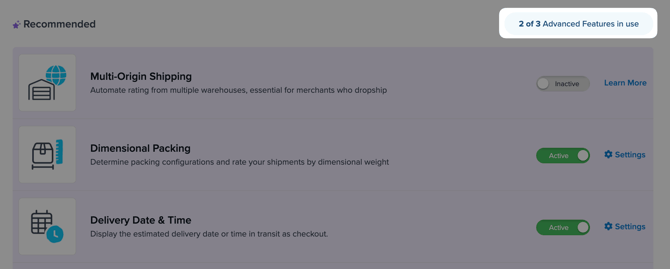
To enable or disable an Advanced Feature, go to Advanced Features in the left-hand navigation of the ShipperHQ dashboard. Toggle the switch next to any feature to Enabled — the feature becomes available immediately. Toggle it off to disable it.
Advanced Features
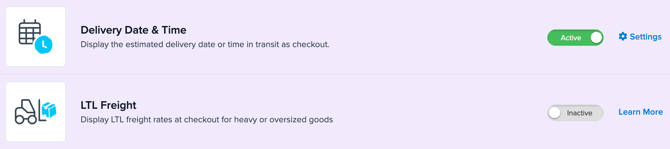
The following features count toward your plan's Advanced Features allotment.
| Feature | What It Does | Setup Guide |
|---|---|---|
| Multi-Origin Shipping | Calculate live rates from multiple shipping locations and warehouses | How to configure Multi-Origin Shipping |
| Dimensional Packing | Rate shipments based on product dimensions; define boxes and packing rules | How to set up Dimensional Packing |
| Delivery Date & Time | Show reliable estimated delivery dates at checkout based on custom logic | How to configure Delivery Date & Time |
| LTL Freight | Enable live LTL freight rates on the frontend | How to configure LTL Freight Carriers |
| In-Store Pickup | Offer customers pickup location options at checkout | How to configure In-Store Pickup |
| Address Validation | Validate customer addresses at checkout and return the appropriate rate | How to configure Address Validation |
| Rate Shopping & Custom Method Names | Display the cheapest available rate and rename shipping methods | How to set up Rate Shopping · How to set up Custom Method Names |
| Backup Carrier Rates | Automatically return rates from a backup carrier when your primary carrier is unavailable | How to configure Backup Carrier Rates |
| Address Type Selector | Let customers identify their address as residential or commercial at checkout | How to configure Address Type Selector |
| Shipping Insights | Pass detailed shipping and packing data from checkout to your ecommerce platform and fulfillment systems | How to use Shipping Insights |
| Product Page Shipping Calculator | Show shipping rate estimates directly on product pages | How to configure the Product Page Shipping Calculator |
| Ship to Store | Ship orders to a retail location for customer pickup — requires Advanced plan minimum; not available on Standard regardless of available slots | How to enable Ship to Store |
Plan Limits vs. Plan Restrictions
There are two distinct situations you may encounter when working with Advanced Features:
You've used all your slots. If your plan's slot count is full, enabling a new feature requires disabling one that's currently active. The dashboard will indicate when you've reached your limit. To swap features, disable the one you no longer need and enable the one you want — the change takes effect immediately.
A feature requires a higher plan tier. Some features are not available on lower-tier plans regardless of how many slots are available. Ship to Store, for example, requires the Advanced plan at minimum and cannot be unlocked on a Standard plan by managing slots. In these cases, the dashboard displays an upgrade prompt next to the restricted feature.

Duties & Taxes
Duties & Taxes is handled differently from the features listed above. It is an add-on with its own pricing structure and does not count toward your plan's Advanced Features slot allotment.
To add Duties & Taxes to your account, contact ShipperHQ or your account manager. For setup information, see Duties & Taxes in ShipperHQ.
Upgrading Your Plan
If you've reached your slot limit and need more Advanced Features, or if you need access to a plan-restricted feature, visit shipperhq.com/pricing to review available plans, or contact ShipperHQ to discuss your options.