
Table of Contents:
- Overview
- Understanding Packing Rules
- Update Existing Box Settings
- Create New Boxes
- Create a Packing Rule for Each Product
- Assign Packing Rules Onto Your Products
- Default Packing Rule for All Other Products
- Result
Overview
By default, ShipperHQ's Packing Rules don't restrict items to only the boxes listed in a rule. ShipperHQ evaluates all available boxes and selects the best option using its Best Fit Algorithm—including boxes marked "Be Used to Pack All Products."
This article explains how to configure Dimensional Packing so ShipperHQ only uses the boxes defined in your Packing Rules (Pack According to Box Rules).
Understanding Packing Rules
When you assign boxes to a Pack According to Box Rule, ShipperHQ makes those boxes available when that rule applies. However, any box set to "Be Used to Pack All Products" remains available system-wide.
This means if boxes are marked "Can Be Used to Pack All Products," ShipperHQ may still use them even when a Packing Rule is assigned. To limit packing to specific boxes only, you'll need to adjust both your box settings and Packing Rules.
Since Packing Rules can be assigned to multiple products simultaneously, the methods covered here ensure that:
- Specific products pack into their designated boxes
- Other products are restricted from using those same boxes (unless configured otherwise)
Steps to Configure:
Update Existing Box Settings
-
Edit each box currently set to Can Be Used to Pack All Products.
-
Deselect this option so these boxes are no longer globally available.
-
Save your changes.
This step prevents those boxes from being automatically considered for all shipments.
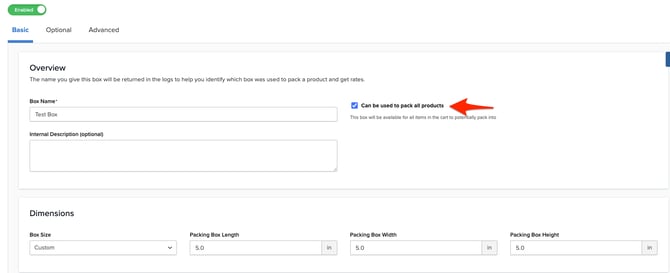
Create New Boxes
Create any new boxes as needed, if the existing boxes you have are not meant for specific products.
Otherwise, the existing boxes, once updated, can be used inside of a packing rule.
If two products can be packed into boxes with identical dimensions, but must be packed into it's own box, create duplicate boxes (with different names) so each rule has its own unique set.
Create a Packing Rule for Each Product
Create one Packing Rule per Product that must be packed separately, or has specific boxes which the product must consider, as needed.
Inside each Packing Rule:
-
Select only the boxes that should be used for products that must be packed separately, or has unique packing conditions.
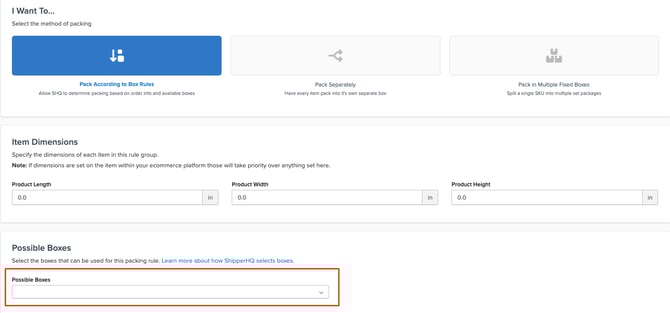
Assign Packing Rules Onto Your Products
- How to Assign ShipperHQ Product Attributes on BigCommerce
- How to Set Up/Assign Product Attributes on Shopify
- How to Assign ShipperHQ Attributes in Magento 2
Default Packing Rule for All Other Products
The steps above outline how to force specific products to pick from carefully selected boxes, but if your catalog has products which can follow the general Best Fit First Algorithm, then you will need to consider creating a default packing rule that will pack all other products not assigned to a packing rule.
If necessary, follow the steps below:
Create a Default Packing Rule
-
In ShipperHQ, create a new Pack According to Box Rule.
-
Set this new rule as your Default Packing Rule.
This ensures any item not assigned to a specific rule will follow your default setup.
Assign Boxes to the Default Rule
-
Add your updated boxes to the newly created Default Packing Rule.
-
Save the rule.
Now, ShipperHQ will only consider the boxes tied to your Packing Rules when determining how items are packed.
Result
After completing these steps:
-
Items assigned to a specific Packing Rule will only use the boxes listed in that rule.
-
Items not assigned to a Packing Rule will use the boxes in your Default Packing Rule.
This configuration ensures ShipperHQ only considers the boxes explicitly tied to your Packing Rules, giving you complete control over which boxes are used during dimensional packing.