
Table of Contents
Overview
This guide will help you set up Local Delivery options in ShipperHQ . If you want to handle local deliveries by yourself instead of using a regular carrier, you're in the right place.
Setup
- Set up a Flat Rate or Table Rate Custom Carrier, then navigate to the Basic tab for the carrier.
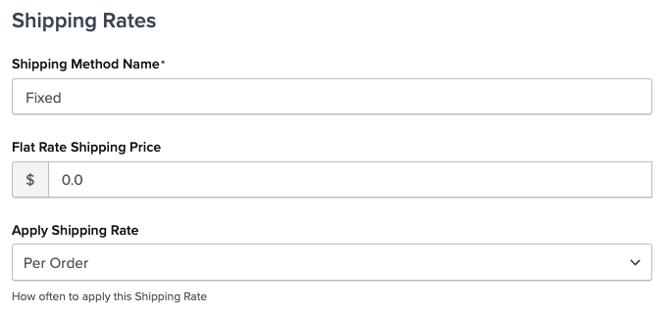
- In your Carrier Settings, under the Basic panel, set your Shipping Method Name (e.g., "Local Delivery").
- Determine the rate for your Local Delivery option:
- For a Flat Rate Carrier, set the price in the Basic panel.
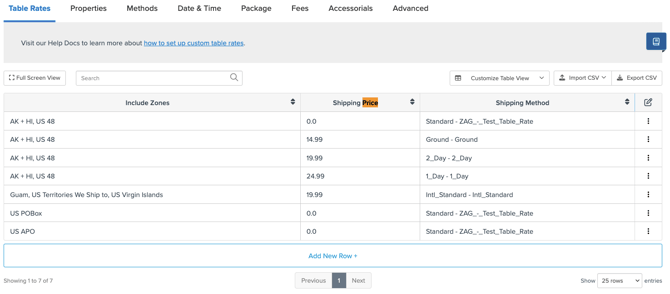
- If using a Table Rate Carrier, go to the Table Rates tab to set your rate based on the conditions of your choice.
- For a Flat Rate Carrier, set the price in the Basic panel.
-
Use the Carrier Service Area dropdown in the Basic panel to define where this carrier will operate. If you have a specific Local Delivery Zone set up in ShipperHQ, it should appear in the dropdown list. Otherwise, you can set it up by going to Shipping Zones under Shipping Rules in the side panel.
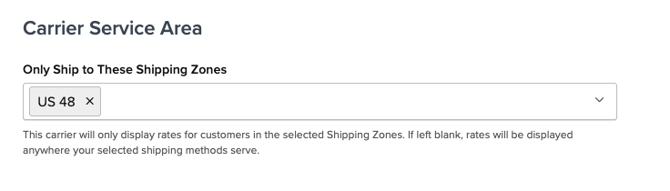
Save the Carrier, and your Local Delivery with the assigned flat rate(s) will activate only when customers are within the designated Zone.