
Overview
Not all shipments get calculated based on dimensional weight. In some cases you may want to ignore package dimensions, but still use ShipperHQ's Dimensional Packing feature to set packing rules or set weight/quantity thresholds.
Example: You shipping small, pliable products like gloves or socks and want to ignore package dimensions, and focus exclusively on limiting the weight and quantity of the products inside a box. This is easy to set up in ShipperHQ.
Keep in mind, this method ignores product dimensions during packing and will not send any dimensions to the carrier.
How to Set Up a Box Without Dimensions
1. Add a New Box
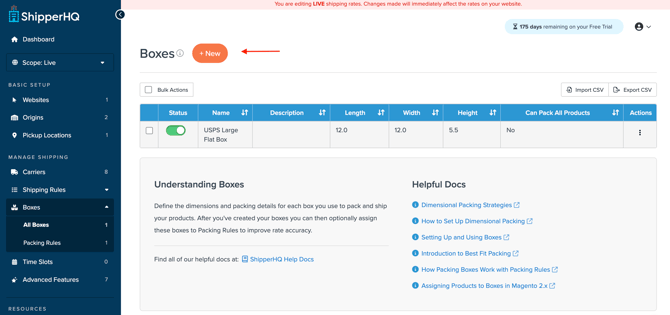
2. Under the Basic tab, to ignore box dimensions, set the length, width, and height to zero. This allows products to fit into the box without accounting for dimensions.

3. Under the Optional tab, you can apply maximum weight and quantity constraints.
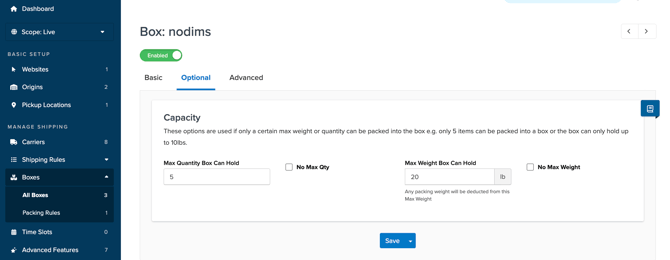
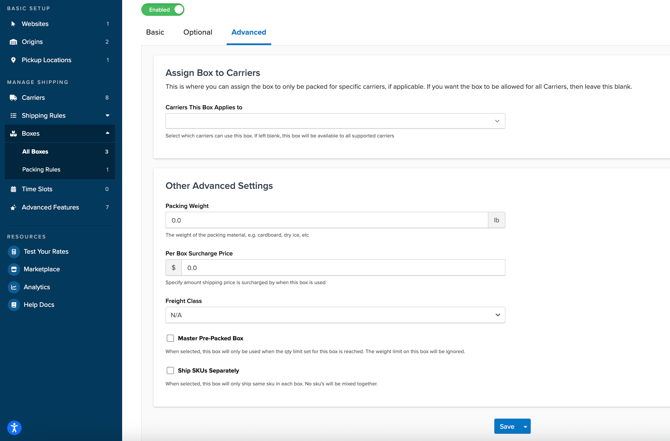
4. Under the Advanced tab, you can:
- Assign the box to specific carriers (leave blank if it can be used for all)
- Add the weight of packing material, like extra padding or dry ice
- Add a per box surcharge price within the shipping rate
- Assign freight class
- Choose to use this box as a master pre-packed box – it will only be used when the quantity limit set for the box is reached
- Choose to use this box only for shipping SKUs separately – it will only ship the same SKU in each box, no SKUs will be mixed together
5. Save the box