
Table of Contents
Duties & Taxes lets you collect or display international duties and taxes at checkout, but not every destination covered by an international carrier needs the same treatment. A shipping zone with different customs rules than the rest of that carrier's coverage — for example, an overseas territory that isn't treated the same as its parent country for duty purposes — may need to be excluded from Duties & Taxes while the rest of the carrier's destinations keep calculating them. This article covers how to exclude a specific region or zone from Duties & Taxes using two scoped carriers.
How It Works
Duties & Taxes are configured at the carrier level, so enabling it applies to every rate request that the carrier handles. ShipperHQ does not currently support excluding Duties & Taxes for specific countries or zones on a single carrier while calculating it for others.
To separate this behavior by region, create two versions of the same carrier, each scoped to a different Carrier Service Area: one with Duties & Taxes enabled for the countries where it should apply, and one with it disabled for the zone you want to exclude. ShipperHQ then selects the correct carrier version based on the shopper's destination.
Requirements
- The Duties & Taxes add-on must be enabled on your ShipperHQ account
- An international live rate carrier must already be configured — see Setting Up Live Rate Carriers and Getting Started with Carriers
- A Shipping Zone covering the region you want to exclude must be defined
Setting Up Two Carriers to Exclude a Region
Creating two versions of the same carrier, each scoped to a different Carrier Service Area, lets you apply Duties & Taxes to most of a carrier's international coverage while excluding a specific country or zone.
- Go to Carriers and create two live rate carriers for the same shipping service — for example, two DHL carriers.
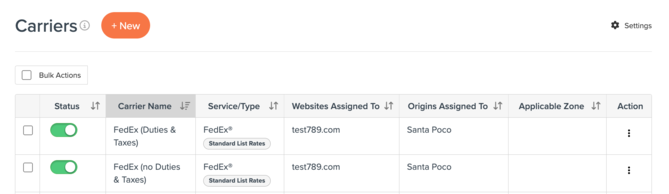
- Edit the first carrier and go to the Fees tab. Check Enable Duties & Taxes, choose your Payment Method (DDP or DDU), then set Carrier Service Area to include every country or zone where Duties & Taxes should apply, excluding the zone you want to omit.
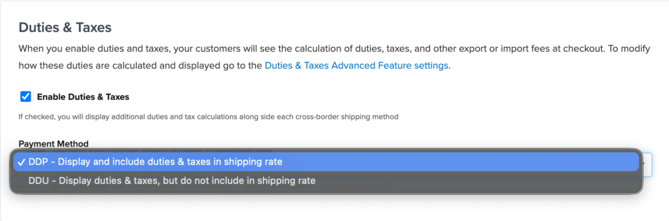
- Edit the second carrier and leave Enable Duties & Taxes unchecked. Set its Carrier Service Area to include only the shipping zone you want to exclude from Duties & Taxes.
- Save your changes to both carriers.
ShipperHQ does not support excluding Duties & Taxes for specific regions on a single carrier — using two carriers scoped by Carrier Service Area is the way to separate this behavior by destination.