
Table of Contents
-
Transit Time Source
-
Origin & Destination Configuration
-
Dispatch Dates
-
Handling Days & Cutoff Times
-
Shipping Rules Impacting Transit
-
Holidays & Non-Delivery Days
-
Storefront Logic
-
Still Seeing Inaccurate Delivery Dates?
Transit Time Source
Delivery estimates rely on transit time data from carriers or configured rules. Verify the following:
-
Carrier API transit days by:
-
Testing directly on the carrier’s website
-
Comparing results with ShipperHQ test rates to identify any discrepancies
-
-
Transit day type
-
Confirm whether transit days are defined as business days or calendar days
-
-
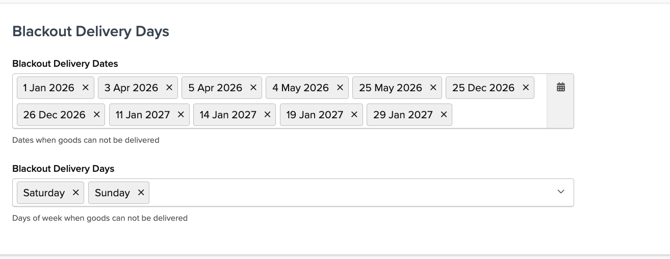
Blackout delivery days
-
Incorrect or misaligned blackout dates can skew delivery estimates
-
To review blackout delivery dates:
-
Go to ShipperHQ > Carriers > Select your Carrier (e.g. UPS) > Date & Time > Blackout Delivery Days:
-
-
Origin & Destination Configuration
Delivery estimates depend on accurate shipment origin and destination details.
-
Confirm the correct origin (ship-from) warehouse is being used
-
Verify the destination ZIP/postcode, country, and state formatting
-
If the origin is incorrect or not covered by transit rules, delivery estimates may be inaccurate
Dispatch Dates
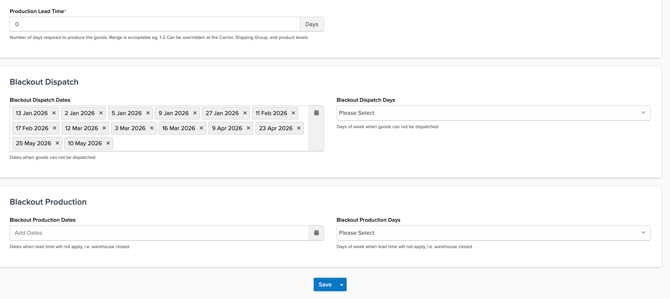
If the dispatch date changes for any reason, the delivery date will automatically adjust. Delivery calculations are based on when the shipment leaves the origin, making dispatch configuration a critical factor.
To review dispatch blackout dates:
-
Go to ShipperHQ > Origins > Select your Origin > Date & Time > Blackout Dispatch
Handling Days & Cutoff Times
A cutoff time determines whether an order can ship the same day or must wait until the next shipping day. Since delivery dates are calculated from the dispatch date, cutoff times directly impact the delivery date shown at checkout.
-
Review cutoff times to ensure they align with your operational expectations
-
Cutoff times can be configured at both:
-
Origin level
-
Carrier level
-
Shipping Rules Impacting Transit
Shipping rules can modify delivery estimates by adding or subtracting days.
-
Review any rules that adjust delivery days
-
Confirm rules are not unintentionally overriding transit logic
-
Broadly scoped rules may apply unexpected changes to delivery estimates
Holidays & Non-Delivery Days
Delivery estimates should account for holidays, weekends, and blackout days.
-
Verify the holiday calendar is correctly configured
-
Confirm weekend delivery settings match carrier capabilities
-
Missing holiday configurations may cause delivery dates to include non-delivery days
Storefront Logic
In some cases, the storefront or theme may alter how delivery dates are displayed.
-
Compare ShipperHQ logs with what is shown at checkout
-
Check for frontend code that adds buffers or custom messaging
-
Differences here usually indicate a display issue rather than a calculation error
Still Seeing Inaccurate Delivery Dates?
If you’ve reviewed the settings above and delivery dates are still incorrect:
-
Capture a screenshot or video of the checkout showing the delivery date
- Contact ShipperHQ Support at Support@ShipperHQ.com
Our support team can review logs and configurations to identify any gaps affecting delivery date accuracy.