
Table of Contents
- Before You Start
- Product Data and Cart Configuration Issues
- Shipping Rules and Rate Logic
- Carrier and API-Related Issues
- Shipping Zones and Coverage
- Address and Validation Issues
- Common Diagnostic Messages
- Troubleshooting Tips
When no shipping methods appear at checkout, it usually means ShipperHQ couldn't return a valid rate for the current cart and destination. This is most often caused by missing product data, a rule or carrier restriction, or a configuration mismatch. The sections below group the most common causes by area to help you quickly identify what's blocking rates.
For a diagnostic workflow, see Diagnosing Shipping Rate Issues.
Before You Start
Before diving into troubleshooting, confirm the following are all in order — any one of these can prevent rates from appearing even when your ShipperHQ configuration is correct:
- Your ShipperHQ configuration is enabled and live
- Your platform integration is connected and active
- Your carriers are enabled and active
- The issue isn't platform-side — for example, a checkout outage, custom checkout template error, or third-party app conflict
Troubleshooting Tips
To narrow down the cause quickly, work through these steps before contacting support:
- Use Test Your Rates — this is the fastest way to see why rates were suppressed. See How to Test Your Rates in ShipperHQ for details.
- Test with a simpler cart — try one product at a time to isolate the issue.
- Temporarily disable rules — helps confirm whether a rule is blocking rates.
- Test a known-good address — use a standard, non-remote address to rule out zone issues.
If you've worked through the below and rates are still not returning, contact ShipperHQ support at support@shipperhq.com. To help troubleshoot faster, include a screenshot of a checkout where no rates appear — make sure it shows the shipping address, the items in the cart, and the rate results section.
Product Data and Cart Configuration Issues
Missing or incomplete product data is one of the most common causes of missing rates. Check the following before looking elsewhere:
- Missing product weight or dimensions — required for all live rate carriers (UPS, FedEx, USPS, DHL, etc.). Add weight and dimensions to all shippable products.
- Products not assigned to a Shipping Group — especially important when using custom rate tables, Shipping Group rule restrictions, freight, or mixed product types.
- Cart exceeds carrier limits — for example, UPS Small Parcel max weight (typically 150 lbs), or max package count or girth limits.
- Oversized or freight-only items without an LTL carrier configured — create a Shipping Group (for example, Oversized or LTL) and mark it as freight. If girth is exceeded but no freight or LTL fallback is configured, no rates will return.
- Mixed Shipping Groups without rules allowing them to ship together — create a merge rule or assign compatible Shipping Groups.
- Non-shippable items (such as digital or subscription products) blocking the cart.
Shipping Rules and Rate Logic
Shipping rules are powerful, but misconfigured rules can suppress all or some methods. If your product data looks correct, review your rules next:
- A hide-all-methods rule is suppressing some or all methods for the cart in question — review your hide rules.
- Conflicting rules — two or more rules blocking the same cart scenario.
- Min/max thresholds not met — cart value, weight, quantity, or dimensions fall outside rule limits.
- Customer-specific rules don't match — customer groups, tags, or login state don't match the rule conditions (for example, a rule that hides rates for customers who aren't logged in).
- No matching rate row — Table Rates or MatrixRates don't contain a row for the cart's zone, weight, price, or Shipping Group. Note that if a table rate applies to some items in the cart but not others, no rates will return for the entire cart.
Carrier and API-Related Issues
Carrier setup issues can also prevent rates from returning, even when product data and rules look correct:
- Invalid or expired carrier credentials — re-enter credentials in the carrier settings.
- Unsupported service requested — for example, international services are not enabled on the carrier account.
- Carrier API downtime or timeouts — try again later or check the carrier's service status.
- Required special services are missing — such as Saturday delivery, COD, hazmat, or liftgate. If required by a rule but not enabled on the carrier, rates will fail.
- Carrier restricted by location — at the carrier level (country or region limitations) or via Shipping Rules limiting where the carrier appears.
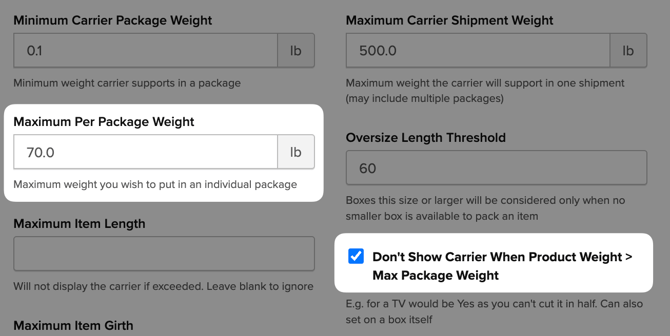
- Maximum Per Package Weight exceeded — if a product's weight exceeds the Maximum Per Package Weight set on a live rate carrier, the carrier will be suppressed entirely by default. To allow multi-package shipments instead, disable the Don't Show Carrier When Product Weight > Max Package Weight setting on the carrier — this will have ShipperHQ to split the order across multiple boxes rather than blocking the carrier. Most carriers have an internal maximum of 150 lbs per package; increasing this setting beyond the carrier's actual limit won't resolve the issue.
Shipping Zones and Coverage
Rates won't return if the destination isn't covered by a Shipping Zone. Check your zone configuration if a specific destination is consistently returning no rates:
- Destination not included in any Shipping Zone — check country, state, and ZIP/postcode coverage.
- Origin zone mismatch — no valid origin-to-destination pairing.
- Remote or excluded areas — common examples include Alaska and Hawaii excluded by a United States 48-states-only setup, or rural ZIP codes excluded from coverage.
- PO Box address — some carriers (such as UPS and FedEx) don't support PO Boxes.
Address and Validation Issues
Address formatting problems can prevent carriers from returning rates even when everything else is configured correctly:
- Invalid characters or formatting — often caused by browser autofill.
- ZIP/City mismatch — especially common with US addresses. Some live rate carriers are strict about this and will return an error rather than a rate if the ZIP code doesn't match the city or state.
- Residential vs. commercial flag mismatch — verify the address type matches what the carrier expects.
- Address validation not enabled or not permitted on the carrier account.
- Remote area surcharges not supported — carrier settings may not allow these destinations.
Common Diagnostic Messages
You may see messages like the following in logs or Shipping Insights. These usually point directly to what's blocking rates.
Address and Validation
- Invalid Origin/Destination Country or State
- City, State, or ZIP is missing
- ZIP / City mismatch
- Address validation not enabled or permitted
Carrier and Limits
- No shipping methods found for carrier
- Carrier connection error or timeout
- Max weight, package, or shipment limits exceeded
- No pickup locations found
- Could not find the requested carrier
Rules and Configuration
- Shipping prevented by a user-defined rule
- No valid rates or dates found
- No carriers configured for this origin
- No merged rates found
- Missing rates for carrier groups
System and Integration
- Google API Key not present
- Carrier sandbox/live mode mismatch