
Table of Contents
Rate Shopping & Custom Method Names is an Advanced Feature that bundles three related capabilities into one toggle.
- Rate Shopping compares shipping methods across different carriers and shows customers a single option for whichever is cheapest.
- Custom Method Names lets you change what any shipping method is called at checkout.
- Carrier Prioritization sets a backup carrier for regions your primary carrier doesn't serve.
If you offer live rates from more than one carrier, checkout can end up listing several similar options side by side, each labeled with a different carrier name. Rate Shopping & Custom Method Names resolves that for you. Together, these three capabilities give you control over cost, clarity, and coverage at checkout, and you can turn on just the ones you need.
Rate Shopping
Rate Shopping compares shipping methods added to the method merge rule across two or more carriers, then returns a single checkout option set to whichever one is cheapest rate. Instead of seeing a separate listing for each carrier's version of that service, the customer sees just one. This comparison happens after your Shipping Rules have already been applied, so a discount or surcharge you've configured on a method still factors into which one wins.
The result's displayed name comes from the Method Merging Rule itself: by default, the rule's own title shows, or you can display the winning method's real name instead.
For setup steps, see How to set up Rate Shopping.
Custom Method Names
Custom Method Names renames one specific method on one specific carrier, wherever it appears at checkout. For example, you can show "Standard Shipping" in place of "FedEx Ground." It works independently of Rate Shopping, for merchants who just want cleaner method names.
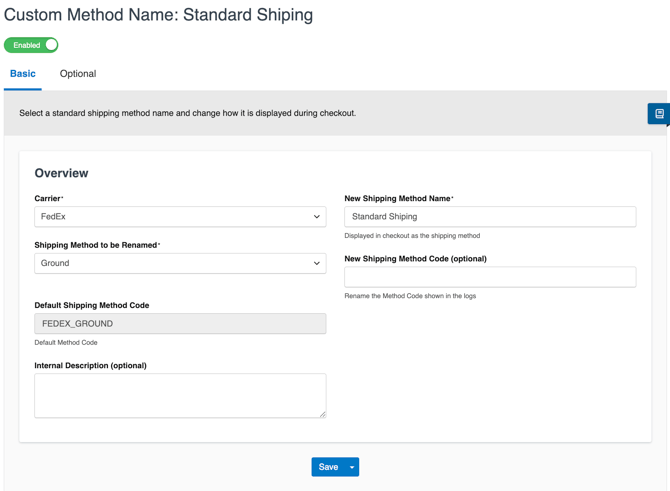
For setup steps, see How to set up Custom Method Names.
Carrier Prioritization
Carrier Prioritization sets a secondary carrier to appear only when your primary carrier doesn't serve a particular region. For example, if your primary FedEx account doesn't deliver to a rural zip code, Carrier Prioritization can automatically show UPS as a backup for that address instead.
You can enable it independently of Rate Shopping and Custom Method Names, or alongside them.
For setup steps, see How to Set Up Carrier Prioritization.