
Overview
Box surcharges add extra handling or packaging fees to specific boxes in ShipperHQ. These fees don’t appear as separate line items in Test Your Rates, so it’s important to verify that they’re being applied correctly.
Creating the Box Surcharge
-
Open the Boxes section in ShipperHQ.
-
Select the box you want to edit or create a new one.
-
Under the Advanced Settings, find Per Box Surcharge Price.
-
Enter the surcharge amount (for example, a $10 fee).
-
Save your changes.

Testing if the Surcharge Appears
To confirm that your surcharge is being applied:
-
Go to Test Your Rates in ShipperHQ.
-
Create a simple cart with a product that uses the same box dimensions as your test box (for example, 7 × 7 × 7).
-
Run the rate test with your carrier.
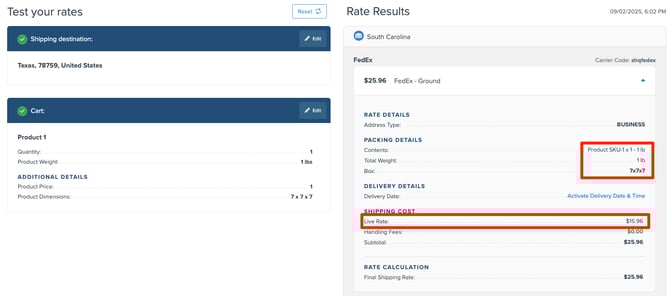
In this example, the FedEx Standard List Rate shows $25.96, while the base carrier rate (without the surcharge) is $15.96. The Packing Details confirm that the 7×7×7 box was used. Because the total rate increased by $10, we know the surcharge was successfully applied.
Alternative Testing
You can also verify the surcharge by temporarily removing it and comparing results:
-
Go back to your box settings and remove the surcharge amount.
-
Save the box and re-run the same rate test.
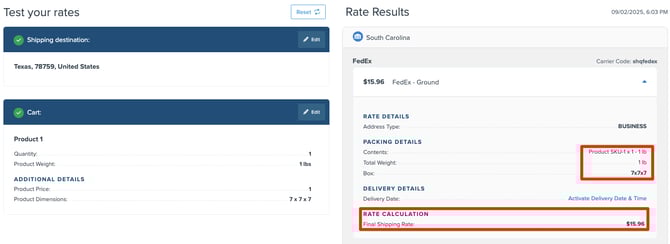
When the $10 surcharge is removed, the total shipping rate is $15.96. After re-adding the surcharge, the total returns to $25.96. This difference confirms that the box surcharge is active and functioning correctly.
Box surcharges won’t display as separate fees in Test Your Rates, but you can easily confirm they’re applied by comparing total shipping costs before and after adding the surcharge. If the total increases by your defined surcharge amount, it’s working as expected.