
Overview:
When using ShipperHQ on the BigCommerce Platform, method names will appear with a parenthese around the method name. This formatting is being applied by the BigCommerce Platform and is not controlled by ShipperHQ.
If you see parentheses around your method names on the BigCommerce Platform, please reach out to the BigCommerce support team for further assistance.

In-Depth Breakdown:
Below is set of testing that walks through where the parentheses comes from.
From our test on a BigCommerce/ShipperHQ account, the screenshot below shows that the “selectedShippingOption” is returning “FedEx (Ground)."
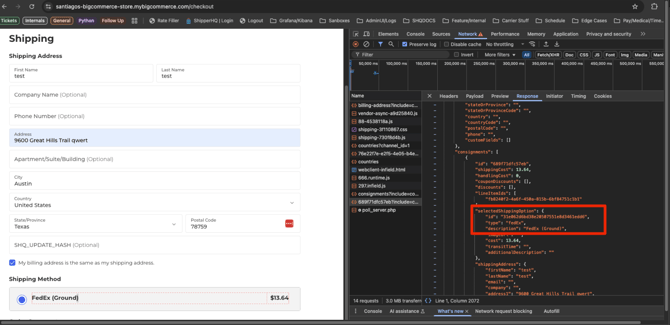
- This object is created and styled entirely within the Commerce platform.
How Commerce creates this:
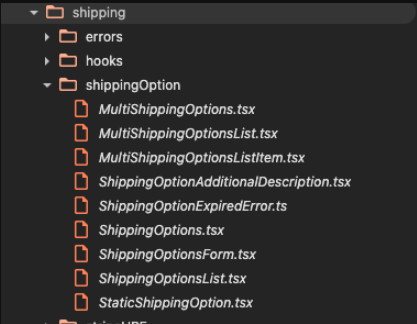
In the checkout JavaScript, BigCommerce creates an element called “shippingOption-desc”, which wraps the method name (e.g., “Ground”) in parentheses. This is controlled by the Shipping folder logic.
Additionally, when running a GET Checkout API Request through the Commerce API Runner (reference), we can see that the parentheses are present in the Commerce API response.
.png?width=670&height=341&name=image%20(6).png)
What ShipperHQ Sends:
ShipperHQ does not send parentheses through the API, our create parentheses in our own system, as can been seen in the JSON response to Commerce.

Next Steps:
If you see parentheses around your method names on the BigCommerce Platform, please reach out to the BigCommerce support team for further assistance on how to remove those, as ShipperHQ cannot control the BigCommerce platform logic.