
Summary:
This guide explains two ways to replace an existing table rate carrier, like "Depot Pick Up," in your ShipperHQ configuration.
Option 1: Delete and Add New Carrier
-
Remove all references to the existing carrier in shipping rules, shipping groups, or other configurations.
-
Delete the carrier.
-
Add the new carrier with your updated settings.
Note: You must remove all associations before deletion to avoid errors.
Option 2: Replace Rate Rows
-
Import a new CSV file with updated methods, prices, and conditions.
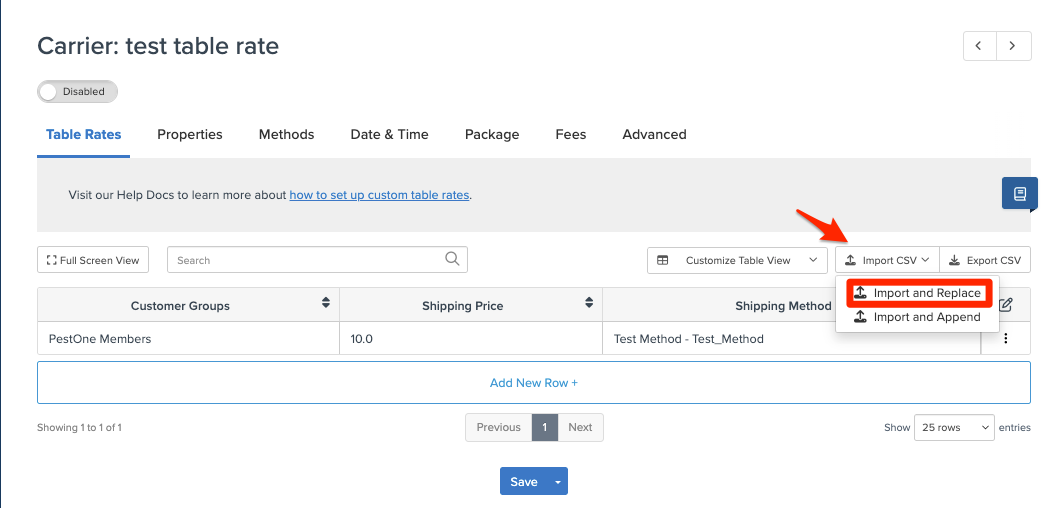
-
Review and update:
-
Shipping rules
- Update methods so shipping rules are applying to the updated carrier
-
Shipping groups
- Update methods so shipping rules are applying to the updated carrier
-
Carrier title and methods
-
NOTE: Choose the method that best fits your workflow. Both options require updates to your configuration.