
Common Reasons
1. Address Validation Not Enabled
The most common cause is that the carrier is not using address validation.
When address validation is disabled, ShipperHQ uses the default address type you’ve configured for the carrier — typically set to Business.
As a result, residential-specific FedEx services, such as Home Delivery, won’t appear at checkout.
Reverse Scenario: FedEx Ground
The reverse can also be true for FedEx Ground.
If your default address type is set to Residential or you’re using validated residential addresses, FedEx Ground may not appear since it is intended for business addresses only.
Ensuring accurate address validation helps FedEx return the correct service type for each destination.
2. Package Exceeds FedEx Home Delivery Limits
Another reason FedEx Home Delivery may not display is if the shipment exceeds FedEx’s size or weight limits for this service.
FedEx Home Delivery supports packages up to:
-
150 lbs (70 kg) per package
-
108 inches (274 cm) in length
-
165 inches (419 cm) in length plus girth (girth = 2 × width + 2 × height)
If any package in the order exceeds these limits, FedEx will not return Home Delivery as an available service. Instead, only methods suitable for larger or heavier shipments (such as FedEx Ground) may appear.
How to Check Your Address Type Setting
-
In your ShipperHQ dashboard, go to Carriers → FedEx.
-
Select your FedEx carrier to open its configuration.
-
Navigate to the Optional tab.
-
Locate the Address Type section.
You’ll find a setting labeled Use Validated Address Type.
-
If this option is unchecked, the carrier will always use the default address type (e.g., Business).
-
If this option is checked, ShipperHQ will validate each address type dynamically and apply the correct FedEx service — allowing Home Delivery to appear for residential destinations.
Example
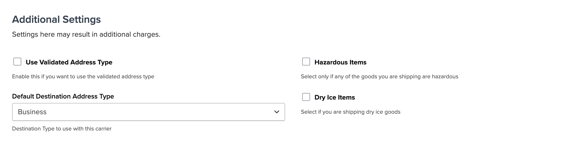
Unchecked (Use Validated Address Type)
-
Default address type: Business
-
FedEx Home Delivery will not appear for residential addresses.
Checked (Use Validated Address Type)
-
Address type is validated automatically.
-
FedEx Home Delivery will appear when a residential address is entered.
Reverse scenario (FedEx Ground)
-
If validation detects a residential address, FedEx Ground will not return as a rate.
-
For business addresses, FedEx Ground will appear as expected.
Still Not Seeing FedEx Home Delivery?
If you’ve confirmed that address validation is enabled and your shipment is within FedEx’s size and weight limits but Home Delivery still doesn’t appear, please contact our Support Team for further assistance.
Email: support@shipperhq.com